
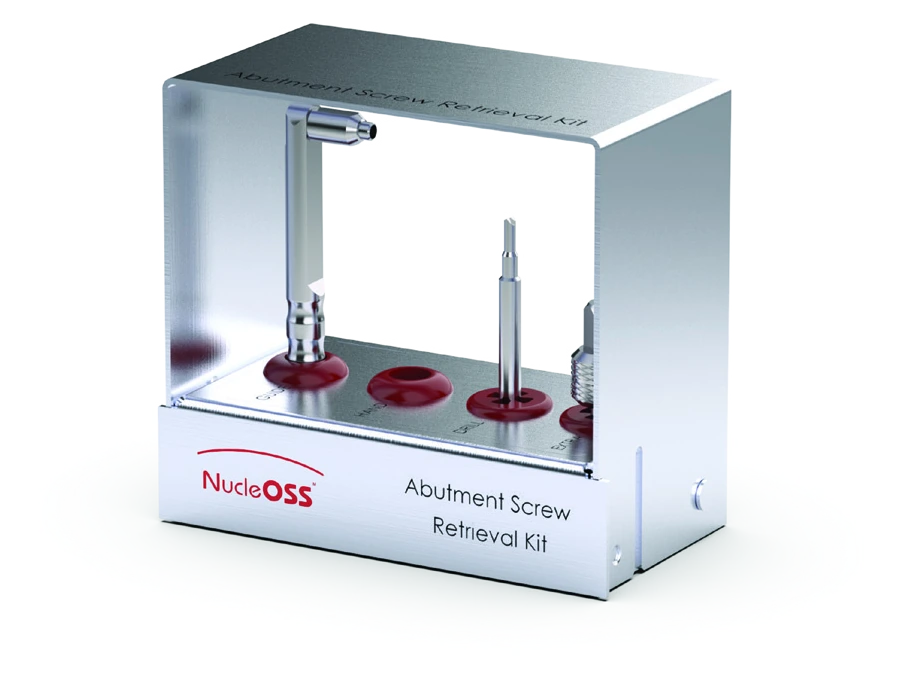
What the kit is for
Metric screws that connect the implant abutments to the implant body can break due to overloading, and the broken lower portion may remain inside the implant body. NucleOSS offers the abutment screw retrieval kit (CRH 113) to provide solutions for such situations for physicians and technicians.
The hex region and throat part of an abutment may also break as a result of overload, leaving the broken lower part inside the implant body. The kit includes a broken abutment removal part for that situation.
- The kit is suitable for NucleOSS T6 Standard and T6 TorQ implants.
- The broken abutment removal part is likewise suitable for T6 Standard and T6 TorQ implants.
- The kit box is made of stainless steel and the tool holders are silicone.
For indications, contraindications and MRI information, see the implant instructions for use.
Kit contents
The kit consists of 4 parts.
| Reference | Part | Description |
|---|---|---|
| T0 25315 | Centering device | Ensures that the screw removal mill is perfectly centred on the broken metric screw and prevents it from slipping outwards. Made of stainless steel. |
| T0 25314 | Hand adapter | A turning adapter used for manual operation of the screw removal mill. |
| T0 0104 | Broken screw removal drill | Made of hard, durable stainless steel. Sharp edges at the tip penetrate and grip the metal. Can be used with a motor or by hand. |
| T0 0105 | Broken abutment removal part | Made of hard, durable stainless steel, with cutting grooves at the tip. Can be used with a ratchet or by hand. |
General work flow
Clean the inside of the implant body where the metric screw has broken with water, vacuum and air. Place the centering device carefully over the implant.
Caution. A screw removal drilling machine should not be used without a centering device.
The sequence, in order:
- The broken screw head and abutment are removed.
- The centering device is placed on the implant.
- The broken screw removal drill is connected to a hand adapter or micromotor.
- The drilling cutter is inserted into the surface of the broken screw by gently pressing it down.
- The drilling machine is turned counterclockwise.
- The broken screw piece comes out.
- Using fluid and vacuum, the fractured screw fragment is removed from inside the implant.
Removing a broken abutment screw
There are two ways to remove a broken screw: by hand and with a micromotor. Both use the centering device and the broken screw removal drill, and both turn the drill counterclockwise.
Method 1: manual removal
- Attach the hand adapter to the back of the screw removal milling cutter.
- Pass the broken screw removal drill through the centering device and press it onto the broken screw, so that the pointed milling cutter tips gently sink into the surface of the broken screw.
- Rotate the drill counterclockwise with gentle pressure. No liquid is used in these steps. Continue rotating until the broken screw is removed.
- Remove the broken screw removal drill and the centering device.
- Remove the broken screw from the implant using vacuum and water.
- Check the implant. If the screw has not come out, repeat the procedure.
Caution. It is important that the bur is embedded in the surface of the fractured screw. Otherwise the drill will spin freely on the fractured screw surface, leading to wear on the drill tip and preventing the screw from being removed.
Method 2: removal with a micromotor
- Attach the drill to the micromotor. Set the micromotor to rotate counterclockwise at 20-40 rpm, at its maximum torque value.
- Pass the broken screw removal drill through the centering device and press it onto the broken screw, so that the pointed drill tips gently penetrate the surface of the broken screw.
- Start the micromotor after applying pressure to the screw with the drill. No liquids are used in these procedures. Continue the turning motion until the broken screw is removed.
- Remove the broken screw removal drill and the centering device.
- Remove the broken screw from the implant using vacuum and water.
- Check the implant. If the screw has not come out, repeat the procedure.
Caution. If a broken screw is to be removed using a micromotor, the speed should be set to 20-40 rpm. It is important that the drill is embedded in the surface of the broken screw; otherwise the bur will rotate freely on the broken screw surface, causing wear on the drill tip and preventing the screw from being removed.
Removing a broken abutment
- Remove the upper part of the broken abutment from the implant before using the broken abutment removal part.
- Clean any debris in or around the abutment by vacuuming.
- Press the broken abutment removal part manually against the fracture fragment remaining in the implant and rotate it counterclockwise.
- When a torque value that cannot be achieved by hand is reached, continue with a torque ratchet.
- After approximately one more turn of torque with the ratchet, pull the fractured abutment removal piece vertically upwards. The fractured portion of the abutment is removed from the implant along with the abutment removal piece.
- If the piece does not come out of the implant, repeat the procedure, increasing the tightening force with the torque ratchet.
Cleaning and handling
Maintenance and cleaning of surgical hand tools:
- Careful use of all tools is extremely important.
- Even the slightest damage to the ends of the drill adversely affects cutting performance and therefore the clinical outcome.
- Even if a drill is used correctly and is clean, its cutting performance is reduced after a certain number of uses. The maximum milling for NucleOSS drills is 15 times.
- Avoid contact between the ends of the drills and any hard surface other than the bone.
- Use each surgical set piece according to its purpose and method of use. Other uses may damage the part.
- Never allow surgical residues (blood, bone and other tissue residues) to dry on a tool. Clean immediately after surgery.
- Clean thoroughly with only soft brushes so as not to cause wear and scratches on the tools. If necessary, remove the removable parts of the tools and clean the gaps.
- Never disinfect, clean (also ultrasound) or sterilise instruments made of different materials together.
- Use only cleaning agents and disinfectants for the material and follow the manufacturer’s instructions for use.
- Rinse disinfectants and cleaning agents thoroughly with water.
- Never leave or store tools moist or wet.
For more detailed information, see the D006 NucleOSS Surgical Instruments User Manual for Cleaning and Disinfection of Surgical Instruments.
Sterilisation
Caution. The manufacturer accepts no responsibility for devices initially delivered non-sterile, regardless of who performs the sterilisation or by what method. Because conditions and environments vary, the ultimate responsibility for implementing and verifying procedures to achieve sterility rests with the user. Non-sterile surgical instruments should not be used under any circumstances.
- Place properly cleaned and dried instruments into the designated slots inside the surgical set box.
- The surgical set is made of highly impact-resistant plastic materials suitable for autoclave sterilisation. In clinical autoclaves the parts can be sterilised as a single piece without being removed from the box.
- Place the surgical set container in the autoclave bag.
- After the cycle is complete, remove the surgical sets from the steriliser and place the tray on a padded surface to prevent condensation during cooling.
Caution. Do not stack boxes while performing the sterilisation process, as this may affect sterilisation effectiveness.
| Parameter | Value |
|---|---|
| Method | Moist heat sterilisation according to ISO 17665:2024 |
| Cycle | Prevacuum |
| Temperature | 134°C / 273.2°F |
| Exposure time | 3 minutes |
| Pressure | 2.2 bar |
| Pre-vacuum | 3 times < 60 mbar |
| Minimum drying time | 60 minutes in the enclosed chamber |
The sterilisation processes are validated in accordance with the current international standard, ISO 17665:2024. The manufacturer’s instructions for use for all detergents, cleaning solutions and equipment and accessories used in cleaning and disinfecting the devices must be strictly followed.
Storage and symbols
After sterilisation, store the devices in a dry, dark place, such as a closed cupboard or drawer.
See the full manual (PDF) for the symbols used on NucleOSS products and the contact details.
The symbols include “Contains hazardous materials”, marked 7440-02-0 Ni (nickel).