
What the kit is for
These are the recommended instructions for use for the surgical applications of the NucleOSS Dental Implant system. Treatment and surgical planning should be performed on the basis of clinical data and the physician’s evaluation of the case.
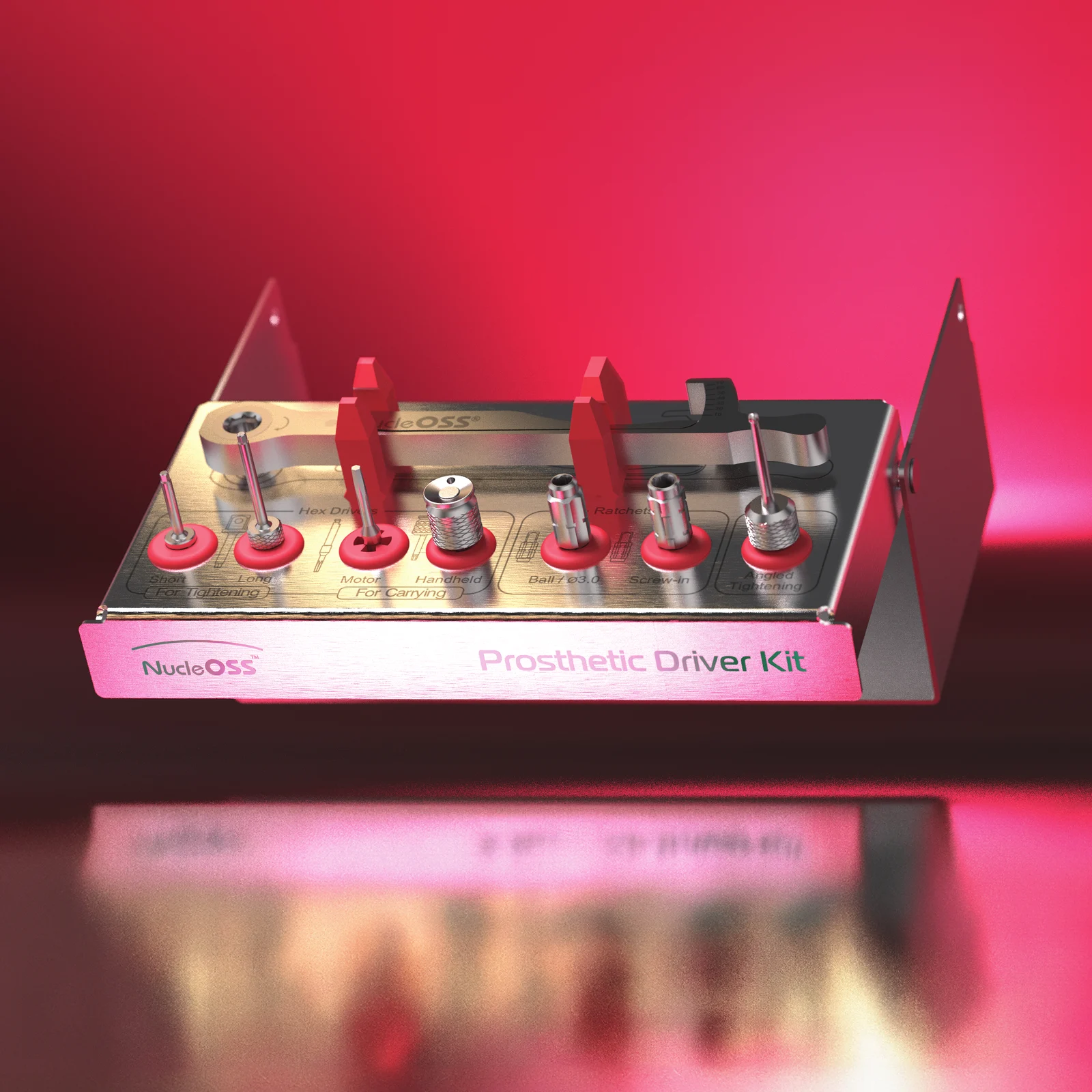
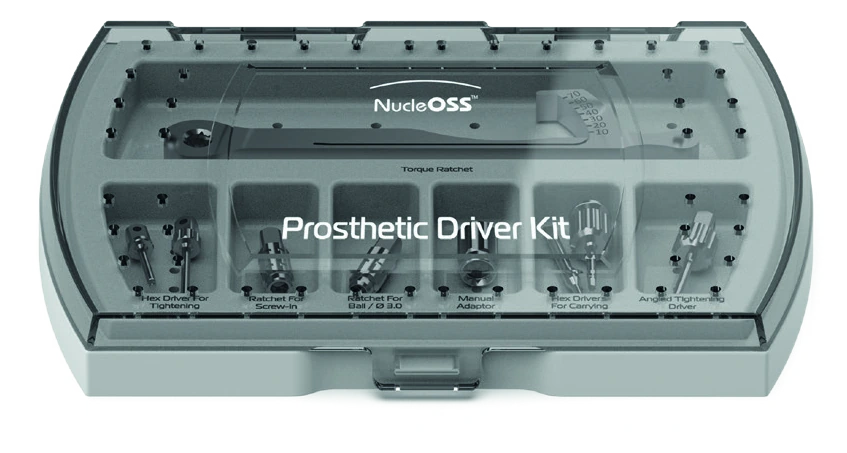
The kit brings together the parts needed for implant-prosthetic surgery in one place.
For indications, contraindications and MRI information, see the implant instructions for use.
Kit contents
| Reference | Part |
|---|---|
| T0 2024 | Hex driver (ratchet-short) |
| T0 2025 | Hex driver (ratchet-long) |
| T0 2009 | Hex driver (micromotor) |
| T0 25251 | Hex driver (manual) |
| T0 25206 | Multi unit abutment tightening part |
| T0 25205 | Ball abutment tightening part |
| T0 25218 | Ratchet manual adaptor |
| T0 2027 | Angled hex driver |
| T0 25900 | NucleOSS torque ratchet |
Hex drivers
There are two kinds of hex driver: transfer drivers, used by hand or with a micromotor, and torque drivers, used with a ratchet.
Transfer drivers T0 25251 and T0 2009
- T0 25251 is the manual hex driver and T0 2009 is the micromotor hex driver.
- A hex driver is used for fixing healing components, prosthetic parts and impression parts.
- It is made of stainless steel and can be procured in a surgical set or as a single piece.
- The tip of the hex driver, used manually and with a micromotor, has a hex structure and a conical shape. The figure marks the length L 12.5 mm beside T0 25251; it marks no length for T0 2009.
- It can be used for carrying connection screws and healing caps and for light tightening.
- Torque up to a maximum of 10 Ncm can be made with these hex drivers.
Caution. Never apply final torque with the hex drivers: the hex slot of the screw or the tip of the hex driver may be damaged.
Torque drivers T0 2024 and T0 2025
- T0 2024 is the short ratchet hex driver and T0 2025 is the long ratchet hex driver. The figure marks their lengths as L: 12 mm and L: 15.5 mm respectively.
- They are used for fixing healing components, prosthetic parts and impression parts, and are used with a ratchet.
- They are made of stainless steel and can be procured in a surgical set or as a single piece.
- The tip of the hex driver used for final torque is straight. It is only used for torque with the NucleOSS ratchet.
- It has no retention and is not used for carrying.
- Hold the screw with a hex driver and place it on the part it will be fixed to.
- Turn the hex driver gently clockwise to tighten the screw.
- Seat the ratchet carefully on the hex driver.
- Tighten the screw by turning the ratchet clockwise. Following the torque values specified at the end point, set the desired torque value and complete the tightening.
Multi-unit and ball abutment tightening parts
Both parts are made of stainless steel and can be used with a ratchet or a screwdriver. In the figure the multi unit abutment tightening part T0 25206 is marked with a double line and the ball abutment tightening part T0 25205 with a single line.
Multi unit abutment tightening part T0 25206
The threaded abutment tightening part is used to place multi unit straight abutments on T6 implants. A multi-unit straight abutment has a threaded connection structure, so attention should be paid to the tightening and torque values when placing it on the implant.
Caution. Attention: the multi unit straight abutment should be torqued to a maximum of 30 Ncm when being placed on the abutment. If the torque value is less or more than the specified value, loosening or breakage of the abutment may occur.
A multi unit angled abutment is placed carefully on the implant by holding the carrying part and fixed to the implant with the connection screw included in the package. The connection screw should be torqued to a maximum of 30 Ncm with the help of a NucleOSS torque ratchet.
Ball abutment tightening part T0 25205
The ball abutment tightening part is used to place ball abutments on a T6 implant. Insert the ball abutment carefully into the implant, then use the ball abutment tightening part (T0 25205) to fix the abutment to the implant. The ball abutment should be torqued to a maximum of 30 Ncm using the NucleOSS ratchet.
Ratchet manual adaptor and angled hex driver
Ratchet manual adaptor T0 25218 is an auxiliary device that allows surgical and prosthetic set components with ratchet attachments to be operated manually when needed. With this adaptor the same components can be controlled both with a ratchet and by hand. It offers more controlled and ergonomic use, especially in clinical stages requiring low torque or precise positioning, or where ratchet use is impractical.
Angled hex driver T0 2027 is used for tightening (torque-ing) or loosening screws on angled Ti-base abutments. It can be used with a ratchet, a ratchet hand adapter or a screwdriver, and can also be used manually. The figure marks the length L 17 mm.
NucleOSS torque ratchet T0 25900
- The torque value of the NucleOSS ratchet is from 0 Ncm to 70 Ncm. When the needle is at the top, it shows about 80 Ncm.
- NucleOSS uses the ratchet to tighten all the abutments and screws at the torque values specified in the product catalogues.
- It is made of stainless steel and can be procured in a surgical set or as a single piece.
Using it as a torqueless ratchet
- Hold the torque arm and torque needle together.
- Press down on the wheel with your finger to hold the ratchet in place.
Caution. The direction arrow should point to the top during tightening and to the bottom during untightening.
Using it as a torque ratchet
- Press down on the wheel with your finger to hold the ratchet in place.
- Pull the torque arm lightly in the direction of the arrow until you reach the desired torque value.
Caution. The torque arm should not be turned more than the torque values specified on the ratchet; otherwise the torque will be incorrect. The direction arrow should point to the top during tightening and to the bottom during untightening.
Using it for removal
Use the ratchet with the direction arrow facing down.
Tightening and torque values
Both torque tables carry the reference T0 25900. In the first table, the tightening parts shown for a group of products apply to every product in that group.
| Product | Tightening parts | Torque value |
|---|---|---|
| Implant cover screw and sinus caps | T0 2024 short (ratchet); T0 2025 long (ratchet); T0 25251 manual hex driver | Manual / ratchet (if a ratchet is used, 10 Ncm) |
| Gingiva former | T0 2024 short (ratchet); T0 2025 long (ratchet); T0 25251 manual hex driver | Manual / ratchet (if a ratchet is used, 10 Ncm) |
| Connection screws of PEEK parts | T0 2024 short (ratchet); T0 2025 long (ratchet); T0 25251 manual hex driver | Manual / ratchet (if a ratchet is used, 10 Ncm) |
| All cemented abutment screws | T0 2024 short (ratchet); T0 2025 long (ratchet); T0 25251 manual hex driver | Max. 30 Ncm |
| Cast abutment screws | T0 2024 short (ratchet); T0 2025 long (ratchet); T0 25251 manual hex driver | Max. 30 Ncm |
| CAD/CAM Ti-base abutment screws | T0 2024 short (ratchet); T0 2025 long (ratchet); T0 25251 manual hex driver | Max. 30 Ncm |
| Product | Tightening parts | Torque value |
|---|---|---|
| Ball abutment | T0 25205 ball abutment tightening part | Max. 30 Ncm |
| Equator abutment | 774CHE equator abutment tightening part | Max. 30 Ncm |
| Multi-unit straight abutments | T0 25206 multi unit abutment tightening part | Max. 30 Ncm |
| Multi-unit angled (17° / 30°) abutment screws | T0 2024 short (ratchet); T0 2025 long (ratchet); T0 25251 manual hex driver | Max. 30 Ncm |
| Parts installed on the multi-unit | T0 2024 short (ratchet); T0 2025 long (ratchet); T0 25251 manual hex driver | Max. 10 Ncm |
| Occlusal screws attached to prosthesis (first of two rows) | T0 2024 short (ratchet); T0 2025 long (ratchet); T0 25251 manual hex driver | Max. 20 Ncm |
| Occlusal screws attached to prosthesis (second of two rows) | T0 2024 short (ratchet); T0 2025 long (ratchet); T0 25251 manual hex driver | Max. 20 Ncm |
For the last four rows, the ratchet drivers and the manual hex driver are listed together, without assigning a driver to each torque value. No more than 10 Ncm may be applied with the hex drivers, and never final torque.
Cleaning and handling
Maintenance and cleaning of surgical hand tools:
- Careful use of all tools is extremely important.
- Even the slightest damage to the ends of the drill adversely affects cutting performance and therefore the clinical outcome.
- Even if a drill is used correctly and is clean, its cutting performance is reduced after a certain number of uses. The maximum milling for NucleOSS drills is 15 times.
- Avoid contact between the ends of the drills and any hard surface other than the bone.
- Use each surgical set piece according to its purpose and method of use. Other uses may damage the part.
- Never allow surgical residues (blood, bone and other tissue residues) to dry on a tool. Clean immediately after surgery.
- Clean thoroughly with only soft brushes so as not to cause wear and scratches on the tools. If necessary, remove the removable parts of the tools and clean the gaps.
- Never disinfect, clean (also ultrasound) or sterilise instruments made of different materials together.
- Use only cleaning agents and disinfectants for the material and follow the manufacturer’s instructions for use.
- Rinse disinfectants and cleaning agents thoroughly with water.
- Never leave or store tools moist or wet.
For more detailed information, see the D006 NucleOSS Surgical Instruments User Manual for Cleaning and Disinfection of Surgical Instruments.
Sterilisation
Caution. The manufacturer accepts no responsibility for devices initially delivered non-sterile, regardless of who performs the sterilisation or by what method. Because conditions and environments vary, the ultimate responsibility for implementing and verifying procedures to achieve sterility rests with the user. Non-sterile surgical instruments should not be used under any circumstances.
- Place properly cleaned and dried instruments into the designated slots inside the surgical set box.
- The surgical set is made of highly impact-resistant plastic materials suitable for autoclave sterilisation. In clinical autoclaves the parts can be sterilised as a single piece without being removed from the box.
- Place the surgical set container in the autoclave bag.
- After the cycle is complete, remove the surgical sets from the steriliser and place the tray on a padded surface to prevent condensation during cooling.
Caution. Do not stack boxes while performing the sterilisation process, as this may affect sterilisation effectiveness.
| Parameter | Value |
|---|---|
| Method | Moist heat sterilisation according to ISO 17665:2024 |
| Cycle | Prevacuum |
| Temperature | 134°C / 273.2°F |
| Exposure time | 3 minutes |
| Pressure | 2.2 bar |
| Pre-vacuum | 3 times < 60 mbar |
| Minimum drying time | 60 minutes in the enclosed chamber |
The sterilisation processes are validated in accordance with the current international standard, ISO 17665:2024. The manufacturer’s instructions for use for all detergents, cleaning solutions and equipment and accessories used in cleaning and disinfecting the devices must be strictly followed.
Storage and symbols
After sterilisation, store the devices in a dry, dark place, such as a closed cupboard or drawer.
See the full manual (PDF) for the symbols used on NucleOSS products and the contact details.
The symbols include “Contains hazardous materials”, marked 7440-02-0 Ni (nickel).